Lessons Learnt in AI Adoption
Lessons Learnt in AI Adoption
I have been working with AI coding agents seriously for a while now. In this post I’ll collect the things I have learnt along the way; Some of it is settled, some of it I am still working out.
Agent skills
The first wave of AI adoption is usually about picking a tool and getting it to do something useful. That part is covered well elsewhere. What gets less attention is what happens after, once the novelty wears off and you start noticing the same friction every day.
The agent doesn’t know your codebase, your conventions, or how your team operates, so you repeat the same context every session.
A skill is a reusable artefact the agent can reach for when a recognisable situation comes up. The analogy I find useful is a library. You don’t copy utilities into every file, you extract them, give them a clean interface, and import them where needed. A skill is packaged knowledge the agent can invoke instead of rediscovering it from scratch each time.
Here is roughly how the pieces fit together:
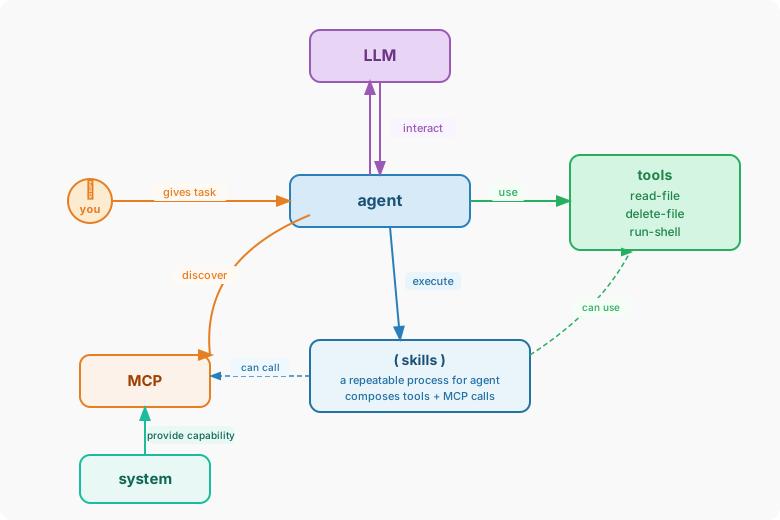
The LLM reasons and decides, but it doesn’t act. The agent is the runtime that acts on those decisions. Tools are primitive, atomic operations. Skills sit above them; They are higher level processes that compose multiple tool calls and MCP calls together, and that composability is what makes them useful.
The key design idea is progressive disclosure. The agent holds a list of skill descriptions, i.e. what each skill does and when to use it. The LLM decides which ones are relevant for a given task and loads only those; Everything else stays out of the context window. Same principle as lazy loading.
One thing I got wrong early on. I tried to design skills upfront: think of a problem, imagine the skill, write the spec. That did not work well.
What works better is starting from the actual problem and collaborating with the agent on solving it. Let it explore the tools on connected MCPs, build scripts, try approaches. Once you notice the agent reaching for the same sequence of steps, that is the point to extract a skill. The skill is the distilled version of what you worked out together.
Testing skills
I am still working this one out.
The intuition is clear enough. A skill is code, or at least structured instructions, and code should be tested. You want to know whether it triggers in the right situations, produces useful output, and doesn’t regress when you update it.
The mechanics are harder than unit testing. Skills invoke an LLM, so the same input doesn’t always produce the same output. Testing a skill is closer to running evals: you define scenarios, run against them, and assess whether the outcomes are good enough rather than whether they are identical.
I am currently thinking about it in three dimensions: trigger accuracy (does the agent call this skill when it should?), output quality (is what it produces actually useful?), and regression coverage (do I know if I have broken something after an update?). I don’t have a clean answer on implementation yet. If you have solved this better than I have, I would like to hear about it.
Sharing skills with the team
This one is clearer, because the software world has already solved the same problem for libraries. When you write something useful you don’t keep it on your machine; You publish it, versioned with semver, with a clear interface, somewhere the rest of the team can depend on it. A 1.0.0 is stable, a 2.0.0 signals a breaking change, and a patch is safe to pick up.
Skills work the same way. The artifact is the skill folder, and the publish step is committing it to a shared repository that your team’s agents can pull from. When a senior engineer works out a better way to handle a recurring task, that knowledge should not stay in their session history.
Agent skills are team knowledge, the same as your internal libraries and your runbooks. Review them, version them, maintain them.
Managing skills locally
Different tools look for skills in different places. Claude uses ~/.claude/skills, Cursor uses ~/.cursor/skills. If you use more than one agent, and most people do, you end up maintaining the same skills in several locations, which gets messy fast.
Skills are also shared in different ways. The most common is a git repository you clone; Your team might have one, or you might pull some in from the community.
My approach is to keep a single source of truth at ~/.agents/skills, and symlink from there into wherever each tool expects to find them.
For project-specific skills, I keep them in the repo under .agents/skills/, then link them into the central location on setup:
for skill_dir in $PROJECT_ROOT/.agents/skills/*/; do
  skill_name="$(basename "$skill_dir")"
  ln -snf "$skill_dir" "$HOME/.agents/skills/$skill_name"
  echo "linked: $skill_name"
done
The skill then lives with the project, is versioned alongside the code, and is still visible to any agent tool on the machine. Updating it in the repo updates what the agent sees, with no manual syncing. It is a small thing, but having one place to look makes the whole setup easier to manage.
Where I’m at
The tools will keep changing; Today’s best option probably won’t be the best option in six months.
What has stayed useful is the approach underneath: pick tools for what they are actually good at, build reusable knowledge instead of starting from scratch every session, and treat your skills as the engineering artefacts they are.
Still working a lot of this out.
AI 落地的那些事
认真用 AI coding agent 已经有一段时间了。这篇文章把沿途学到的东西收拢一下;有些已经想清楚了,有些还在摸索。
Agent skill
AI 落地的第一阶段通常是选一个工具,让它做点有用的事。这部分别处已经写得很多了。较少被提到的是之后发生的事:新鲜感消退之后,你开始每天碰到同样的摩擦。
agent 不了解你的代码库、你的规范,也不知道你团队怎么运作,所以每次新会话你都得重复一遍相同的上下文。
skill 是一个可复用的制品,agent 在遇到熟悉的场景时可以直接调用。我觉得最顺手的类比是库。你不会在每个文件里复制粘贴工具函数,你把它们提取出来,给一个干净的接口,然后按需导入。skill 是打包好的知识,agent 可以直接调用,而不是每次从头摸索一遍。
各个概念大致是这样配合的:
LLM 负责推理和决策,但它不直接行动。agent 是执行这些决策的运行时。tools 是粒度很细的原子操作。skill 在这之上;它是更高层次的流程,可以把多次 tool 调用和 MCP 调用组合在一起,这种组合能力正是它有用的原因。
关键的设计思路是渐进披露(progressive disclosure)。agent 持有一份 skill 描述列表,i.e. 每个 skill 是什么、什么时候用。LLM 决定哪些和当前任务相关,只加载那些;其余的不进入上下文窗口。和懒加载是一个道理。
我早期犯过一个错误。我试图提前设计 skill:想好一个问题,构思 skill,写规范。这条路走不通。
更有效的做法是从真实问题出发,和 agent 一起解决它。让它探索连接的 MCP 上有哪些可用工具,写脚本,尝试各种方案。等你发现 agent 总是在重复相同的操作序列,那才是提取 skill 的时机。skill 是你们一起摸索出来的东西的精华版。
怎么测试 skill
这个我还在摸索。
直觉上很清楚。skill 是代码,或者至少是结构化的指令,而代码应该被测试。你想知道它是否在正确的场景下触发、产出是否有用、更新之后有没有回归。
但具体怎么做比单元测试难。skill 会调用 LLM,同样的输入不一定每次产出一样的结果。测试 skill 更接近跑 eval:你定义一组场景,跑过去,评估结果是否足够好,而不是是否完全一致。
我现在大致从三个维度来想:触发准确性(该调用的时候调用了吗?)、输出质量(产出的东西真的有用吗?)、回归覆盖(改完之后我能知道有没有搞坏什么吗?)。但在实现层面还没有清晰的答案。如果你有更好的解法,我很想听听。
怎么在团队里共享 skill
这个看得清楚一些,因为软件世界对同样的问题已经有解法了。写了有用的东西,你不会留在自己机器上;你会发布它,用 semver 版本化,有清晰的接口,放在团队可以依赖的地方。1.0.0 是稳定版,2.0.0 意味着破坏性变更,补丁版本可以安全升级。
skill 应该以同样的方式运作。制品是 skill 文件夹,发布就是把它提交到团队 agent 可以拉取的共享仓库。当一个资深工程师摸索出处理某类重复任务的更好办法,这个知识不应该停留在他的会话历史里。
agent skill 是团队知识,和你的内部库、你的 runbook 是一回事。review 它们,给它们版本,维护它们。
本地管理 skill
不同的工具在不同的地方找 skill。Claude 用 ~/.claude/skills,Cursor 用 ~/.cursor/skills。如果你同时用多个 agent,大多数人都这样,你就得在好几个地方维护同一套 skill,很快就会乱。
skill 的共享方式也各不相同。最常见的是一个 git 仓库,clone 下来就用;团队可能有一个内部的,你也可能从社区拉一些。
我的做法是在 ~/.agents/skills 维护一份单一来源,然后从这里软链接到各个工具期望的位置。
对于项目相关的 skill,我把它们放在仓库的 .agents/skills/ 下,在环境初始化时链接到中央位置:
for skill_dir in $PROJECT_ROOT/.agents/skills/*/; do
  skill_name="$(basename "$skill_dir")"
  ln -snf "$skill_dir" "$HOME/.agents/skills/$skill_name"
  echo "linked: $skill_name"
done
这样 skill 跟着项目走,和代码一起版本化,同时对机器上任何 agent 工具都可见。在仓库里更新 skill,agent 看到的立刻就更新了,不需要手动同步。细节而已,但有了一个统一的地方可以查,整套东西管理起来轻松很多。
现在到哪了
工具会一直变;今天最好的选择,六个月后未必还是。
一直有用的是底下那套思路:根据工具真正擅长的事情来选工具,积累可复用的知识而不是每次从头开始,把 skill 当成它本来就是的那种工程制品来对待。
很多东西还在摸索。